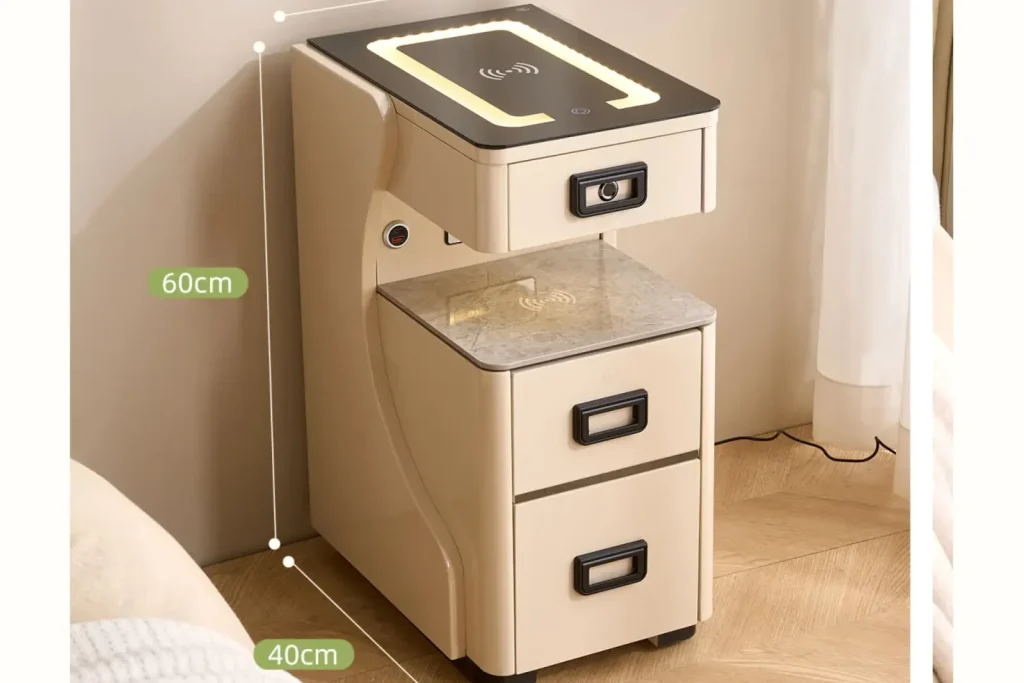
Wireless charging gets a lot of attention in smart nightstands because it is easy to show in a photo. But many bedroom users still rely on ordinary cables, USB ports, Type-C ports, adapters, watches, reading devices, lamps, and small electronics. That makes the power module and cable-management plan just as important as the wireless charging surface.
This article looks at the less glamorous part of smart nightstand development: where power enters the cabinet, how cables move inside the furniture, whether ports are easy to reach, how heat and strain are handled, and what buyers should confirm before a sample becomes a repeat order.
Kuan Zhang’s view is that power access should be treated as part of the furniture layout, not as an accessory added at the end. If the cabinet looks clean but cables bend sharply, adapters are hard to replace, or ports are placed where users cannot reach them, the smart feature will create daily friction.
Why Power Modules Deserve Their Own Review
A power module may include USB-A ports, Type-C ports, a wireless charging input, a low-voltage output for lighting, a speaker power line, a lock power connection, or a plug socket depending on the product design. These parts are not identical, and they should not be hidden behind one vague line in a quotation.
For buyers, the first question is what the module is expected to do. Is it only for low-power phone charging? Does it support a specified Type-C output? Does it feed LED lighting or a speaker? Is the adapter external or built into the furniture? Which market plug or voltage is being considered? The answers affect cost, testing, packaging, documentation, and after-sales responsibility.
This is different from the previous discussion of wireless charging in smart nightstands. Wireless charging focuses on phone placement, surface material, module alignment, and heat around the charging zone. Power-module planning is broader: it covers every path that electricity takes into, through, and out of the cabinet.
Port Position Changes Daily Use
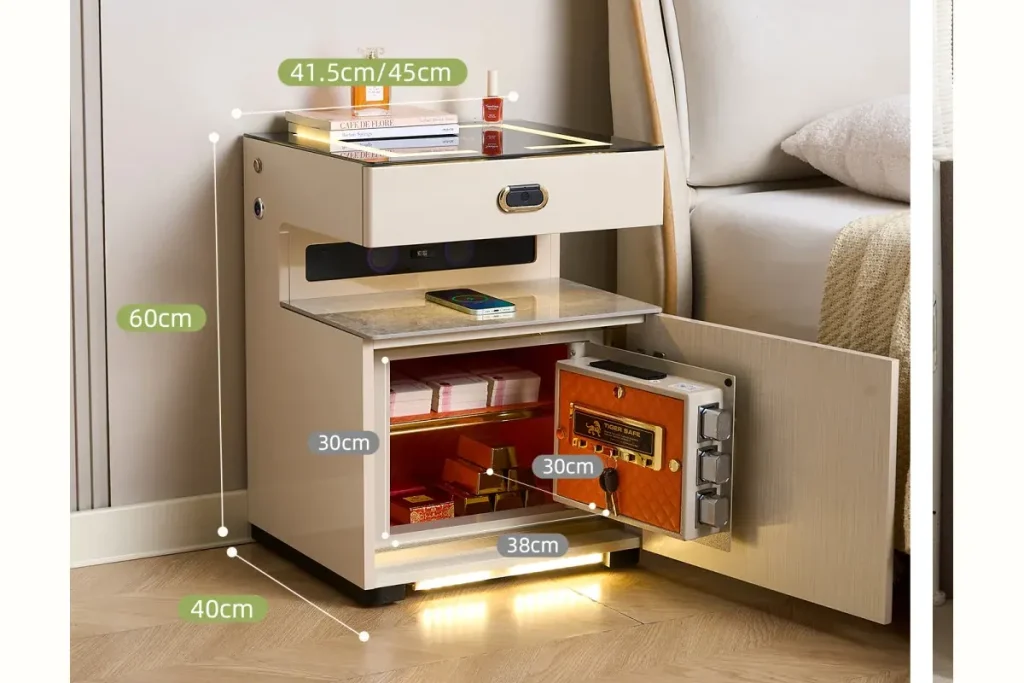
A USB or Type-C port is only useful if the user can reach it naturally. Ports placed too far behind the nightstand may be difficult to access after the product is beside a bed. Ports placed inside a drawer may keep the exterior clean, but the cable can interfere with drawer movement. Ports placed on the top surface are easy to see, but they compete with cups, phones, books, and lamps.
Buyers should test port position with real bedside behavior. Place a phone on the top. Plug in a cable. Open and close the drawer. Put a lamp on the surface. Add a book, glasses, tissue box, and water cup. A layout that looks clean in the factory may become awkward once normal bedside items are added.
For dealers, clear port access is a selling point. A product page can show where the cable plugs in, where the phone rests, and how the wire exits without crossing the whole top surface. That kind of explanation is more useful than simply writing “USB charging” in a bullet list.
Type-C Claims Need Precise Wording
Type-C is now expected by many customers, but buyers should be careful with claims. A Type-C port shape does not automatically mean high output, fast charging, or broad device support. If the product page claims a specific output level or charging speed, the supplier should provide the module specification and the buyer should test it with realistic devices and adapters.
For many furniture channels, clear and conservative wording is better than overclaiming. A product can say that it includes USB and Type-C charging access if the specification supports that statement. It should not promise fast charging unless the module, adapter, cable, and target-market documentation support the claim.
This is where the guide on furniture product specification sheets before quotation becomes useful. The power module should be written into the product brief with port type, quantity, position, adapter, cable length, output assumption, testing method, and packaging requirement.
Cable Routing Is a Furniture Design Problem
Inside a smart nightstand, cables may pass near drawer runners, hinges, lock parts, LED strips, speaker modules, mirror lids, or back panels. If the cable path is not planned, the cable can be pinched, pulled, bent, or rubbed during normal use.
Good cable routing does not need to be complicated, but it should be deliberate. The supplier should show where the cable enters, how it is fixed, where connectors sit, how much movement clearance exists, and how the cable is protected from drawer action. If the cabinet is flat-packed, the assembly process should also prevent the user from trapping the cable by mistake.
Buyers should ask for interior photos during sample review. A polished exterior does not prove that the wiring path is clean. If the inside looks improvised during sampling, the problem often becomes worse during mass production because workers need a repeatable process.
Heat and Ventilation Should Not Be Ignored
Smart nightstands are still furniture, often made with wood-based panels, finishes, drawers, fabrics, paper manuals, packaging materials, and stored personal items. Electrical components should therefore be placed with sensible clearance and normal-use testing.
Heat risk depends on the module, output level, adapter, cable path, surface material, and how the user stores items around the area. Buyers should not make unsupported claims about safety or performance. They should instead ask the supplier how the module is tested, whether the final cabinet construction leaves enough clearance, and whether instructions warn users against covering vents or placing unsuitable objects near electrical parts.
The broader sourcing article on smart nightstands and connected bedroom furniture covers module, cable, heat, and service questions at category level. For a power-access product, these details are not optional extras. They are part of the product definition.
Accessory Planning Affects Returns
A nightstand with a power function may need an adapter, cable, instruction sheet, reset tool, spare connector, or market-specific plug. If any accessory is missing or unclear, customers may report the whole product as defective. This is especially common when the cabinet looks finished but the power function cannot be used immediately.
Buyers should define what is included in the carton. Is the adapter included or supplied by the user? Is the cable fixed or removable? Is the plug type suitable for the target market? Is the instruction sheet specific to the product, or is it a generic note that does not match the actual module?
Dealers can reduce confusion by showing the included accessory set in photos or product copy. A small image of the adapter, cable path, and port position can prevent customer assumptions before purchase.
Service Access Matters After the Sale
A power module is not only a selling feature. It is also a part that may need service. If a USB port becomes loose, a cable breaks, or an adapter fails, can the buyer replace a module without replacing the whole nightstand? Can the supplier provide the same module later? Is the module screwed, clipped, glued, or built into the panel in a way that makes repair difficult?
Kuan Zhang often treats this as a supplier capability question. A furniture factory does not need to manufacture every electrical component, but it should understand how the component is installed, protected, tested, packed, and replaced. If the supplier cannot explain that process, the buyer should slow down before placing a larger order.
The article on furniture factory capability checks before order is relevant because smart furniture depends on repeatable assembly, not only a good-looking first sample.
Packaging Has to Protect the Functional Area
Power ports, adapters, cables, top panels, glossy surfaces, lighting parts, and control areas can all be damaged during transport. Packaging should hold accessories in a fixed position and prevent them from scratching the cabinet. It should also protect any area where a cable exits the furniture or where a module is mounted near a panel edge.
For export orders, buyers should request packing photos before shipment. The carton should not only protect corners and panels. It should protect the functional parts that make the product smart. If the power module arrives loose or the adapter is missing, the customer will not care that the cabinet finish looks good.
The same logic appears in bedroom furniture packaging and loading checks, but a powered nightstand raises the stakes because the accessory set and electrical area must arrive intact.
Dealer Opportunity: Sell Convenience Without Overclaiming
For dealers, power access is easy to explain when the product is photographed correctly. Show the port location. Show the cable route. Show where a phone, lamp, or reading device sits. Show the drawer still opening when a cable is connected. These practical details make the product feel more believable than a vague smart furniture label.
The opportunity is not only charging. It is a cleaner bedside setup. A well-designed power module can reduce loose adapters around the bed, support multiple small devices, and make the nightstand feel like a practical station for modern bedroom routines.
The dealer should still avoid claims that the product cannot support. If the module is basic, describe it clearly. If it supports a higher output, keep the supporting specification. Clear wording protects the dealer and gives buyers a better chance to compare supplier quotes honestly.
Buyer Checklist
- Define the exact power function: USB, Type-C, socket, wireless charging input, lighting output, speaker power, lock power, or mixed module.
- Confirm port quantity, position, output assumption, adapter, cable length, plug type, and target-market requirements.
- Test port access with normal bedside items, drawer movement, lamp placement, and cable bending.
- Ask for internal photos showing cable routing, connector position, fixing method, and strain protection.
- Review heat clearance, ventilation assumptions, and user instructions for normal operation.
- Confirm whether the module, cable, adapter, or connector can be replaced after shipment.
- Make the accessory list explicit: adapter, cable, manual, reset tool, spare parts, or market-specific plug.
- Check packaging protection for ports, top surface, cable exits, adapters, accessories, and instructions.
Final Note
Power modules and cable management are not as visually dramatic as lighting or speakers, but they shape daily use more than many buyers expect. A smart nightstand becomes more useful when the user can plug in devices naturally, keep cables under control, and trust that the function will keep working after shipment.
For buyers, the practical goal is repeatability. Specify the module, test the layout, inspect the wiring path, confirm accessories, and protect the functional area in packaging. For dealers, the opportunity is to show a cleaner bedside routine without making claims the product cannot support.