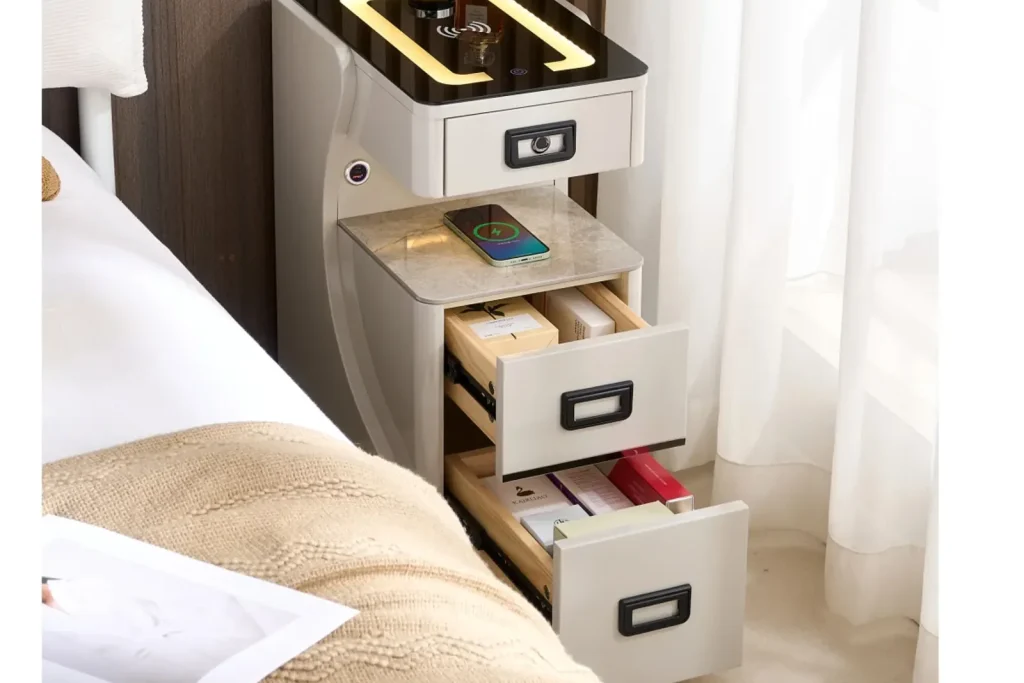
Smart nightstands are often discussed through visible functions: wireless charging, lighting, Bluetooth speakers, private storage, or a lighted mirror. But there is another layer that decides whether those functions feel useful in daily life: the control interface.
A touch panel, button strip, hidden switch, or small display may look like a minor detail in a product photo. In real use, it can decide whether the customer understands the product, whether the dealer can demonstrate it quickly, and whether the buyer receives after-sales questions after shipment.
Kuan Zhang’s view is that smart furniture should be judged by how calmly it works beside the bed. A nightstand can have many functions, but if the user cannot find the control area in low light, if the icons are unclear, or if the product reacts unexpectedly, the smart feature becomes a source of friction.
The Control Area Is Part of the Furniture Experience
A normal nightstand is easy to understand. The user sees drawers, shelves, handles, and a top surface. A smart nightstand adds another question: how does the user control the function? That question is not only technical. It affects appearance, cleaning, safety, packaging, showroom demonstration, and product page communication.
The control area may sit on the top panel, drawer front, side panel, mirror frame, or inside a compartment. Each position creates a tradeoff. A top control panel is visible and easy to demonstrate, but it competes with phones, glasses, cups, books, and bedside lamps. A side switch can look cleaner, but it may be harder to find in the dark. A hidden control can make the cabinet look simple, but it may confuse first-time users.
That is why the control interface should be specified early. Buyers should not treat it as a small decision made after the cabinet design is finished. Once wiring, drawer space, top-surface material, and packaging are fixed, changing the control position can become costly.

Why Dealers Need a Clear Interface
For dealers, a smart nightstand must be explainable in a short demonstration. A customer should be able to see the control area, understand the main functions, and try the product without reading a long manual. This matters in showrooms, online videos, live selling, and retail product pages.
A clear interface also supports product tiering. One model may use simple buttons for lighting and charging. Another may use a cleaner touch panel with more functions. A higher model may add a display, sensor mode, or smart-home-related function. The dealer can explain the upgrade if the interface looks intentional rather than random.
The risk is adding functions faster than the interface can support them. If one small panel controls lighting, charging, audio, lock, sensor mode, and mirror light without clear logic, the product may look advanced but feel confusing. Dealers then spend more time explaining basic use, and customers may hesitate before buying.
Touch Panels Can Create Mis-Touch Problems
A bedside top surface is busy. People place phones, watches, glasses, water cups, books, tissues, remotes, and small personal items there. If a touch panel is too sensitive or placed where items naturally rest, the user may trigger a function by accident.
Mis-touch is not only inconvenient. A light may turn on at night. A speaker may start pairing. A lock or drawer function may behave unexpectedly. A customer may think the product is defective when the real issue is control placement and sensitivity.
Buyers should test the panel with real bedside behavior. Place a phone near the control area. Move a hand across the top in low light. Put a book or tissue box near the panel. Clean the top surface with a cloth. These simple tests reveal whether the control interface is practical or only attractive in a product rendering.
Icons and Labels Need Market-Side Thinking
Icons are small, but they carry a lot of meaning. A light symbol, charging symbol, Bluetooth symbol, lock symbol, fan symbol, or sensor symbol may be obvious to one user and unclear to another. If the product will be sold across different markets, the interface should avoid unnecessary text and use symbols that are easy to understand.
At the same time, icons should not be decorative. They need enough contrast, durable printing or engraving, and consistent lighting if the panel is backlit. A faint icon may look elegant in a showroom but become hard to read in a real bedroom. A bright icon may help visibility but disturb the bedroom atmosphere.
The same specification discipline used in furniture product specification sheets applies here. Buyers should define icon style, position, printing method, backlight behavior, and sample approval standard rather than letting each supplier choose a different layout.
Local Control Still Matters
Some smart furniture discussions focus on app or voice control. Those can be useful in certain product strategies, but a bedside cabinet still needs reliable local control. A user should be able to turn a light on, switch off audio, open a drawer, or reset a function without depending only on an app, Wi-Fi connection, or voice assistant.
For dealers and buyers, this is a practical point. Local control reduces confusion in showrooms. It also reduces after-sales pressure when a customer changes phone, loses app access, moves house, or uses the product in a guest room. If app or voice functions are included, the manual should clearly explain what works locally and what depends on external setup.
This connects with the earlier article on smart nightstands and connected bedroom furniture. A connected feature should not make the basic furniture function fragile. The cabinet should remain understandable even when the connected layer is not being used.
Control Logic Should Match the Bedroom
The bedroom is a low-attention environment. People use the nightstand while tired, waking up, reading, or moving in low light. Control logic should therefore be simple. A short press, long press, double tap, mode cycle, or reset sequence may be acceptable, but the buyer should test whether normal users can understand it.
Memory behavior also matters. If the customer sets a low light level before sleep, does the light remember that setting next time? If power is disconnected, does the product return to full brightness? If a sensor mode is active, can the user turn it off easily? Small details like these shape daily satisfaction.
For a single-function article on lighting, LED lighting in smart nightstands covers brightness, sensor behavior, glare, and night use in more detail. The control-interface question sits above all of those functions because the user still needs a simple way to operate them.

Service Access and Replacement Planning
A control panel is also a service part. If the touch panel, board, cable, or connector fails, can it be replaced without destroying the cabinet? Can the supplier provide the same panel later? Is the panel bonded into the top surface, screwed into a removable part, or connected through a serviceable module?
These questions are especially important for importers, distributors, and project buyers. A small after-sales issue can become expensive if the only solution is replacing the whole nightstand. Buyers should ask the supplier to show the control panel installation, connector type, cable path, and replacement method during sample review.
The article on furniture factory capability checks is relevant because smart furniture depends on coordination between cabinet production and electrical components. The factory does not need to make every electronic part itself, but it must control installation, testing, packaging, and documentation.
Packaging Should Protect the Interface
Control panels can be scratched, pressed, cracked, or loosened during packing and shipment. A top panel may look protected from the outside while the control area is still vulnerable to pressure from accessories, foam, or inner packaging. If the panel includes a display, glossy surface, or backlit icon area, surface protection should be checked carefully.
Packaging should also keep cables and adapters organized. If a customer opens the carton and cannot find the power adapter, reset tool, or instruction sheet, the control interface may be blamed before the product is even used. Clear accessory placement reduces unnecessary complaints.
The broader packaging logic in bedroom furniture packaging and loading checks applies directly, but smart nightstands add another layer: the functional surface must arrive undamaged and understandable.
Buyer Checklist
- Confirm where the control area sits and whether it conflicts with normal top-surface use.
- Test touch sensitivity with phones, books, cleaning cloths, and low-light hand movement.
- Review icon clarity, contrast, backlight behavior, printing durability, and market readability.
- Check whether key functions can still be controlled locally without app or voice setup.
- Confirm press logic, reset sequence, memory behavior, and what happens after power loss.
- Ask how the panel, cable, connector, and control board can be replaced after shipment.
- Protect the panel, display area, cables, accessories, and instructions in packaging.
- Prepare dealer training points so the product can be demonstrated quickly and accurately.
Final Note
A smart nightstand is not improved only by adding more functions. It is improved when the user can understand and control those functions without effort. The control interface is where the cabinet, electronics, and daily bedroom routine meet.
For dealers, a clear interface makes the product easier to demonstrate. For buyers, it reduces confusion, service risk, and inconsistent supplier quotes. For users, it decides whether the smart nightstand feels like a useful bedside product or a complicated cabinet with too many hidden rules.