
Product photography is often treated as the last step after a nightstand sample has been approved. In practice, it is one of the clearest tests of whether the product brief is complete. When a buyer cannot explain which version was photographed, what the image shows, or whether the visible details match the final order, the retailer can create customer expectations that production will struggle to meet.
A polished bedroom scene may attract attention, but it cannot replace clear evidence of the actual cabinet. Customers and sales teams need to understand the size, drawer layout, finish, handles, legs, storage, charging area, and visible functions. Buyers need a photo set that supports the product file instead of creating a second, less controlled version of the product.
Kuan Zhang’s view is that the photo shoot should be treated as a product approval gate. If the team finds it difficult to photograph the right colour, show a feature honestly, or explain an opening mechanism, the product details may still need work before the range is listed or the purchase order is released.
Lock the Sample Version Before the Camera Is Set Up
The most common problem is not a poor camera angle. It is an unclear sample version. A photo may show one handle, one board finish, one drawer layout, or one power-module position while the order later uses another. This can happen when a factory sends a display sample, a development sample, and a production sample without a clear version record.
Before photography, buyers should confirm the product code, overall dimensions, finish reference, handle, leg, drawer construction, hardware, and any smart components. If the cabinet has a charging pad, light, Bluetooth speaker, lock, mirror, or touch panel, the exact component version should be part of the same review. The product specification sheet before quotation gives a practical framework for keeping these details in one controlled record.
A small label on the back of a sample is useful for factory handling, but it is not enough for a buyer-facing process. The photography request should identify the approved version by product code and include the details that must not change without written approval.
Give Each Image a Clear Job
A useful product set normally combines more than one type of image. The main front view lets the customer recognize the cabinet. A side or angled view shows depth, leg position, and the relationship between the top and drawer fronts. An open-drawer view gives evidence of storage and construction. A close view can show a handle, edge, control area, charging surface, or material texture. A room image helps the buyer understand scale and style.
These images should answer different questions. Repeating the same front angle six times may look consistent, but it leaves out the information that reduces uncertainty for an online customer or a retail salesperson. At the same time, a dramatic room scene should not hide the product behind bedding, decorative objects, or shadows.
For a multi-function cabinet, the product brief should state which functions must be visible. The article on smart nightstands and connected bedroom furniture explains why a functional feature needs to be considered as part of the whole product, not added as a vague marketing claim after the sample is finished.
Use Room Scenes to Explain Scale, Not to Conceal It
A bedroom or showroom scene is valuable because it helps a buyer see the nightstand beside a bed, lamp, headboard, floor, and surrounding furniture. It can show whether the height feels intentional, whether the cabinet looks too deep for a narrow room, and whether the finish works with the rest of the collection.
But a room scene should be accompanied by a clean product image. Bedding can make a cabinet look smaller, low lighting can hide a colour difference, and a wide-angle room photograph can make a tall cabinet appear more compact than it is. The image set needs both context and clarity.
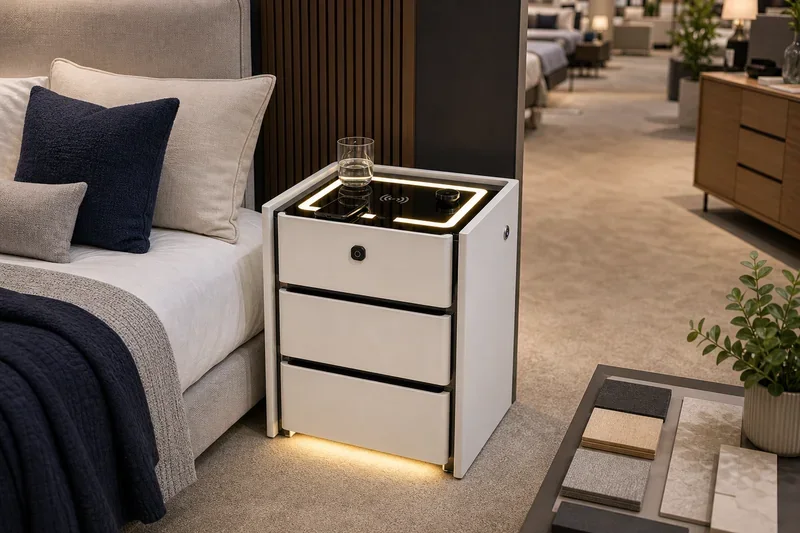
The guide to nightstand height and bed dimensions is relevant when preparing a room scene. The bed, mattress, bedside surface, and opening clearance should make sense together. A photo should not imply a proportion that the actual product cannot deliver.
Colour and Finish Need a Controlled Reference
Lighting changes the appearance of wood grain, paint, glass, metal trim, and high-gloss surfaces. A cabinet photographed under warm showroom lights can look different from the same cabinet in a daylight listing image. This does not mean photography must guarantee identical colour on every screen. It means the buyer should know which physical reference is approved and should avoid using pictures that materially misrepresent the sample.
For a range with several finishes, photograph each approved finish or clearly state when an image shows a reference version. Do not use a light oak image to represent a darker walnut version simply because the cabinet shape is the same. Where finish variation is natural, the catalogue and internal product file should describe that honestly rather than relying on a heavily edited image.
The article on surface durability for smart nightstands is useful here because frequently touched tops, control areas, and decorative trims deserve both close inspection and clear visual treatment before they are promoted.
Show Functional Features in a Way Buyers Can Verify
Connected features often create the largest gap between a listing and the delivered product. A charging pad may be photographed with a phone that is not actually charging. A light strip may be shown at a flattering brightness without revealing the control position. A drawer may appear deep until a cable module reduces the usable space. A lockable compartment may be shown open without clarifying how it works.
For this reason, the buyer should request feature-specific images that are tied to the approved sample. Show the relevant control, the usable surface, the cable access, the drawer layout, and any visible indicator. The image does not need to become a technical manual, but it should not create a promise that the sample cannot support.
Buyers checking charging layouts can connect this stage to the earlier note on power modules and cable management. The product image and the mechanical layout should tell the same story.
Photograph Details That Affect Returns and Complaints
Online customers cannot touch the cabinet before they buy it. Images should help them understand details that may otherwise become a reason for dissatisfaction: the actual handle shape, drawer fronts, leg clearance, open compartments, cable openings, shelf depth, mirror position, or the edge profile of a top.
For flat-packed products, a buyer may also need an image of the parts or a clear explanation of what the customer receives. For assembled products, the visual set should not suggest a level of assembly or accessories that are not included. The article on smart nightstand unboxing and setup can help teams align product images with the actual customer delivery and setup experience.

Set a Delivery Standard for the Photo Set
A good shoot can still create confusion if the image files are mixed together without labels. Buyers should request a simple delivery structure: product code, finish code, view type, feature, and image status. For example, a file name can distinguish a front product view from an open-drawer detail or a room scene. The aim is not a complicated asset system. It is to prevent the wrong finish, old sample, or decorative shot from being used as the main listing image.
Keep the original approved images and note the version they represent. If a handle, finish, electrical component, or drawer arrangement changes later, recheck the images before a new order or retail update. This is especially important when a range is photographed early in development but supplied over several seasons.
What Buyers Should Approve Before a Listing Goes Live
- The photographed product code and its approved dimensions, finish, hardware, and functional components.
- A clean main product image plus views that explain the side, back, storage, and relevant details.
- A room scene that shows genuine scale without hiding the cabinet or changing its apparent proportion.
- Feature images for charging areas, controls, lights, locks, mirrors, speakers, or cable access where applicable.
- Colour and finish images matched to an approved physical reference, with no misleading substitute finish.
- Open-drawer or open-door views where interior storage and usable space matter to the product decision.
- A delivery file structure that identifies product code, finish, view type, and image version.
- A process for replacing images when the sample or production version changes.
Final Note
Product photography should make a nightstand easier to understand, not easier to misunderstand. A well-planned image set supports the retailer, gives the customer a more accurate picture, and forces the buyer and supplier to agree on what is actually being sold.
Before a new range is listed, review the photographs with the sample, drawing, and order details in front of you. When all four match, the images become a useful commercial asset rather than a future source of avoidable questions.